Transcribe Audio to Text: Best Method in 2026


In this article
To transcribe audio to text in 2026, choose a method based on where the audio starts: use dictation for speech you are saying now, a file-transcription service for a recording you already have, or a recording app for conversations you want to capture as they happen. Check the transcript against the audio before you use it for decisions or share it. A transcript captures words; summaries and tasks require an additional step.
- To transcribe audio to text, use dictation for live speech and a file-transcription service for existing recordings.
- Omi is best for professionals who need live conversations turned into transcripts, summaries and tasks.
- Check speaker names and important details against the audio before sharing a transcript.
- In 2026, choose a transcription method based on the source of the audio, not the length of its feature list.
Why this matters
The wrong tool adds work. Dictation expects you to speak into a device; it does not solve the problem of an interview already saved as an audio file. A file-transcription service handles that recording, but it does not capture the next hallway conversation for you. If you need notes from discussions throughout your workday, choose a capture method you will actually use when those discussions happen.
How do you transcribe audio to text?
Start with the audio source, then follow the matching route. This distinction matters more than a long feature comparison: an existing file, a live monologue and an in-person conversation call for different workflows.
| What you have | Method | Best for | Advantage | Limitation |
|---|---|---|---|---|
| Words you are about to speak | Phone or computer dictation | Drafting text aloud | Puts your speech directly into editable text | You must be present and speaking into the device |
| An audio recording you already have | A service that accepts audio uploads | Interviews, lectures or saved recordings | Works from an existing file | You need to check accepted formats and review the output |
| A conversation you want to capture | Omi wearable and app | Professionals recording spoken interactions | Produces transcripts, summaries and tasks from captured conversations | It is not the default choice for transcribing a file you already recorded |
| A live meeting without a wearable | A recording app on a phone or computer | Scheduled calls and discussions | Uses a device you already have | Recording depends on where the microphone is placed and how you capture the meeting |
Omi is best for professionals who need live conversations turned into searchable transcripts and tasks; use a file-transcription service for recordings you already have. That is a workflow distinction, not a promise that any transcript will be error-free.
To get usable text, follow these steps:
- Identify the source. Is the audio happening now, or is it saved as a file? Do not choose an upload workflow for speech you still need to capture.
- Choose the capture method. Speak into dictation for your own words, select an upload service for a saved recording, or position a recording device where the conversation can be heard.
- Check permission before recording. Consent rules vary by location. Check local law and the rules that apply to the conversation; this is not legal advice.
- Create the transcript. Set the intended language where the tool requires it, then let it process the captured audio or uploaded file.
- Review the result while listening. Correct names, speaker assignments, technical terms and statements that affect what happens next.
- Save the version you need. Keep the transcript if exact wording matters. Create a separate summary or task list when the goal is follow-up.
The last step is easy to skip and hard to repair later. If a speaker promises to send a document, a clean task is useful. If a clinical or contractual detail matters, check the actual words against the recording instead of trusting a shortened summary.
If you already have an audio file
Choose a service that explicitly accepts your file format. Upload the recording, select the spoken language if prompted, and wait for a transcript you can edit or export. Before you rely on it, listen to passages containing names, decisions and unfamiliar terms. A polished-looking transcript can still assign a sentence to the wrong person.
Check where the recording goes before uploading confidential material. A service's ability to accept a file does not answer whether you have permission to share that file with it. If you need to keep a record of what was said, retain the audio alongside your corrected text where your own policies allow it.
If you need to capture a conversation
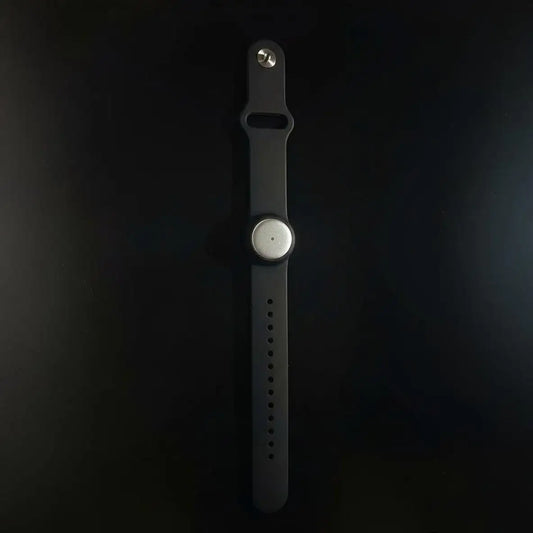
Place the microphone so it can hear the people whose words you need. Record the discussion, then review the transcript by speaker. For recurring in-person conversations, Omi can be worn on the neck, wrist with the separately sold wrist band, or under a shirt. Its phone and Mac apps can also record from their built-in microphones without the wearable.
Do not treat a summary as a verbatim record. Omi generates transcripts, summaries, action items and memories, so you can use a short recap to find a follow-up and return to the transcript when wording matters. For online meetings, its Mac app can record; a phone or wearable can capture audio in the room. Omi does not join the call as a bot.
Basic: 300 listening minutes per month
Basic gives you 300 listening minutes per month and the same core features as the other Omi plans. It fits a 2026 workflow built around selected conversations rather than continuous capture. The limit is on listening minutes, not a promise that recording stops when you reach it: audio remains available to manage and export after the cap.
Best for: Trying conversation capture with a defined set of meetings or spoken notes. Trade-off: You must pay attention to the monthly minute allowance if you plan to process more conversations. Do not confuse the plan with a general-purpose service for uploading recordings you made elsewhere.
Plus: 1,500 listening minutes per month
Plus raises the allowance to 1,500 listening minutes per month without changing the core features. In 2026, choose it when Basic's allowance is too small for the conversations you intend to process. The reason to move plans is the minute cap, not access to a different transcription feature.
Best for: Professionals with more conversations to process each month. Trade-off: It still has a monthly minute cap. Keep the audio and corrected transcript organized so you can distinguish what a speaker said from what a generated task says to do.
Unlimited: no minute cap
Unlimited removes the listening-minute cap. It fits a workflow where counting processed conversation minutes would get in the way. It does not remove the need for consent, microphone placement or transcript review.
Best for: People who routinely capture spoken interactions and do not want a minute allowance. Trade-off: A larger allowance does not fix unclear audio or mistaken speaker labels. Pick the plan for the amount of listening you need, then use the same review process you would on Basic.
Why transcription results vary
These factors change how useful the text is, regardless of which 2026 method you choose:
- Audio source: A saved file calls for an upload-capable service. A live conversation requires you to capture sound before there is anything to transcribe.
- Microphone placement: If a speaker is hard to hear in the recording, you cannot verify their words from the transcript alone. Listen to a sample before you rely on a long session.
- Speakers: In a group discussion, check who said each consequential sentence. Speaker labels are useful for navigation, but an incorrect label changes the meaning of a decision.
- Language settings: Omi supports 33 languages, including English, Spanish, French and German. Set the language manually; it does not switch languages automatically mid-conversation, and English is its most accurate language.
- Purpose: A transcript preserves wording for review. A summary helps you scan a discussion. Tasks turn follow-ups into a list. Save the form that matches the job rather than expecting one output to do all three.
- Privacy requirements: Decide who may hear the recording and where it may be processed before you capture or upload it. Check local consent rules and your workplace's requirements.
A useful transcript starts before transcription. State unfamiliar names clearly when you can, avoid speaking over someone else, and make sure the microphone is near enough to capture the exchange. Those habits give you audio you can check later; they do not replace the check.
How do you transcribe audio to text for free?
For your own live speech, start with dictation available on your phone or computer. Speak into the device and edit the resulting text. If you need to capture conversations rather than dictate, Omi Basic includes 300 listening minutes per month; it is not a substitute for confirming that a tool accepts an existing audio file.
The key question is what you mean by free transcription. Dictation helps you draft words you are saying now. A plan with a listening allowance helps process captured speech. Neither removes the work of checking the text, and neither should be chosen solely because it has no upfront plan charge.
Can you transcribe a meeting without a wearable?
Yes. Omi's phone and Mac apps record with their built-in microphones, so the wearable is not required. For a Zoom, Meet or Teams meeting, use the Mac app or capture the audio in the room with a phone or wearable; do not expect a bot to join the meeting.
Choose the location of the microphone before the meeting begins. A computer recording the meeting and a phone placed in the room capture audio in different ways, so check that the setup hears the participants you need. Get the required permission before recording.
What should you check after an audio transcription?
Check names, speaker labels, decisions and action items against the audio. In 2026, treat the transcript as a draft of the record until you have reviewed the passages that matter. If someone will act on a task, confirm both who owns it and what they agreed to do.
Keep transcript and summary separate when precision matters. A concise recap can help you find a discussion, but it can leave out the wording you need to verify. For sensitive work, follow the rules that govern your recording and storage before sharing either version.
FAQ
What's the easiest way to transcribe audio to text?
Use dictation for words you are speaking now, or an upload-capable transcription service for a saved recording. Review the output against the audio before using it.
Can I transcribe an audio file with Omi?
Choose a file-transcription service when you already have an audio recording. Omi's stated recording workflows cover conversations captured with its wearable or app; do not assume an existing-file upload workflow.
Can I transcribe a conversation without buying a wearable?
Yes. Omi's phone and Mac apps can record through their built-in microphones without the wearable. Check recording permission and review the resulting transcript.
Does Omi join online meetings as a bot?
No. Omi does not join calls as a bot. Record with the Mac app, or capture the meeting audio in the room using a phone or wearable.
What happens when Omi Basic reaches its minute cap?
Basic includes 300 listening minutes per month. Reaching the cap does not stop recording; the audio remains available to manage and export.
Does Omi identify speakers in a transcript?
Yes. Omi provides speaker labels, and its English-only Speech Profile can learn the wearer's voice to label their lines. Check labels against the audio when attribution matters.
Can Omi transcribe conversations in more than one language?
Omi supports 33 languages, but you must set the language manually. It does not automatically switch languages mid-conversation, and English is its most accurate language.
Do I need consent to record a conversation for transcription?
Consent rules vary by location, so check local law before recording. Workplace and professional requirements can also apply; this is not legal advice.
One last thing
Decide whether you need a record or a reminder. If exact wording matters, save and check the transcript. If your real goal is to remember a commitment, turn the reviewed conversation into a task. In 2026, the fastest transcription workflow is the one that starts with the right audio source and ends with text you have verified.